Multi-Server Automation

Script Runner

Execute SQL scripts across multiple servers and databases simultaneously. Organize servers into groups, reuse SQL templates, compile-check every target before you run, then search, chart, and export the answers to Excel, CSV, or JSON. Save the whole run as a shareable project file and repeat it any time — all from a single portable .exe with no installation.
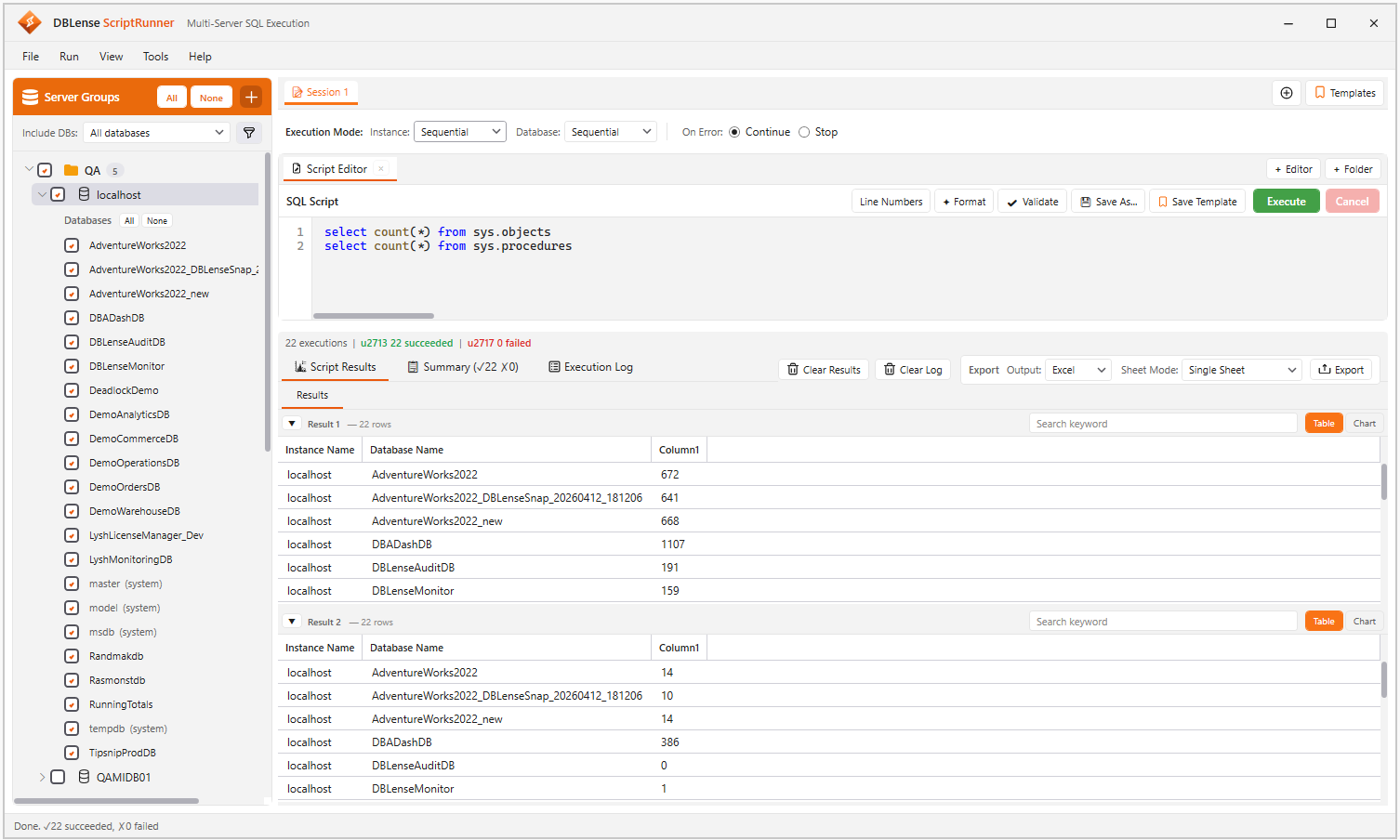
DBLense Script Runner interface

Script Execution Features

Everything you need to run one script against a whole fleet — and to understand what came back.

Server Group Management

Organize servers into logical groups — Production, Staging, Development, DR. Four authentication modes including Entra ID with MFA. Explicit All/None selection with parent checkbox gating so children cannot run unless the parent is checked.

Two-Axis Execution Control

Set how servers run (Sequential or Parallel) and how databases run within each server (Sequential or Batched with a tunable batch size) — independently. Everything from a fully serial rollout to a wide fan-out.

Script Editor, Templates & Folder Mode

SQL syntax highlighting, line numbers, and execute-selection-only. Save reusable scripts to a grouped, searchable template library, or run a whole folder of .sql files in the order you choose.

Saveable Project Files

Bundle your scripts, the exact servers and databases you selected, and every execution option into a single .dbsrproj file. Reopen it next quarter, hand it to a colleague, or commit it next to your SQL — script folder paths are stored relative to the project, and credentials are never written.

Validate Before You Deploy

Compile-check with SET NOEXEC ON against every selected target, so a script that compiles on one server but references a missing column on another is caught before it runs. No DML or DDL is executed.

Script-to-Target Routing

Send different scripts to different servers in a single run. Route by filename (script@server--db.sql) or by a -- @target: comment, with wildcard support and Azure Managed Instance name matching.

SSMS-Style Multi-Result Grids

One tab per script and one grid per result set, each merged across every target and collapsible independently. Instance Name and Database Name are prepended to every row so you always know where it came from.

Instant Search Across Results

An always-visible search box on every grid filters across all columns as you type, with a live "N of M rows" counter. Find the one failing database in a 200-row fleet result in seconds.

Built-In Charts

Turn any result set into a Column, Bar, Line, Area, or Pie chart without exporting first. Pick which numeric columns to plot, set axis labels and ranges, position the legend, then copy to clipboard or save as PNG.

Excel, CSV & JSON Export

Color-coded Excel with Single Sheet, Sheet Per Group, Server, Database, or Script layouts — always including an Execution Summary sheet. Or export UTF-8 CSV, or structured JSON for downstream tooling. Choose whether to include results, summary, and log.

Execution Summary & Log

Per-target status, rows, duration, error, and timestamp in one filterable grid, with a per-script pass/fail breakdown. The timestamped log captures PRINT and RAISERROR output from every database.

Keyboard-Driven Workflow

F5 execute, Shift+F5 cancel, F6 validate, Ctrl+Shift+F format, Ctrl+Shift+E export, Ctrl+S save project, plus Ctrl+T/W/N/O for sessions and workspaces. Keep your hands on the keyboard.

Faithful Data & Secure Credentials

int and bigint both widen to 64-bit so DMV counters never overflow, and binary columns render as SSMS-style hex. Saved passwords are encrypted with Windows DPAPI and are never included in registration exports.

Multi-Tab Sessions & Themes

Run independent sessions side by side, each with its own targets, settings, and results — and multiple editor or folder workspaces inside each. Dark and light themes with Fluent-style chrome.

See Script Runner in Action

A short walkthrough of multi-server execution, validation, results, and export.

Open full demo page

Simple, Per-User Pricing

Pay per seat, billed annually. Volume discounts apply automatically as your team grows.

Select your team size for automatic volume pricing:

Exact seat count:

1–5 users — $249/user/year

Annual license

Script Runner

$249 /user/year

$20.75/user/mo  ·  $249 total

System Requirements

OS:Windows 10/11 or Windows Server 2016+
SQL Server:SQL Server 2012+ (any edition)
Azure:Azure SQL DB & Managed Instance
Depends on:ClosedXML for Excel export

Automate Multi-Server Deployments

Run scripts across your entire infrastructure in seconds. Download the free trial today.